
API
rev.1.5
Specification
| Protocol | HTTPS More than TLS1.2 |
| Authorization method | Token-based authentication |
| Login name | Administrator account of the partner. Use a partner system management supervisor account presented by OMRON Healthcare, a partner administrator account, or a group administrator account. |
| Connection destination host name | OMRON Healthcare provides this with the partner system management supervisor account. |
| Interface | RESTful |
| Data format | JSON |
| Character code | utf-8 |
Vital Data Acquisition Steps
Step1: Get an access token
curl -v -X POST \
-H "Content-Type: application/json" \
  "https://{authentication server domain}/oauth2/token" \
  -d '{
        "grant_type": "password",
        "username": "user_123456",
        "password": "123ABC"
			}'
{
"id" : USER_ID,
"access_token" : {ACCESS_TOKEN},
"refresh_token" : {REFRESH_TOKEN},
"expires_in" : 2147483647,
"token_type" : "bearer"
}Request Header and Body Parameters
| Endpoint | https://{authentication server domain} 1/oauth2/token |
| Method | POST |
1:Authentication server domain will be presented by OMRON Healthcare.
| Header | Content-Type required | string Specify “application/json” |
| Body | grant_type required | string Specify "password”. |
| username required | string Specify username for partner or group account. | |
| password required | string Specify password for partner or group account. |
Response Parameters
| id | string A unique ID that identifies the account in the B2BDSP. |
| access_token | string Access token |
| refresh_token | string Refresh token Refresh tokens are valid for 10 years. |
| expires_in | long Expiration date of access token(Seconds) |
| token_type | string Type of token |
Response Status Code (Sample)
| Value | Description |
|---|---|
| 200 | Success |
| 400 (Bad Request) | Example: "Invalid request parameter" "URL is wrong" "Authentication failure" |
| 404 (Not Found) | Example: "Request resource not found" |
| 500 | Example: "Internal Server Error" |
Step2: Get vital data
curl -i -X GET
  -H "Authorization:bearer xdrgPxxjHV2brPBu8aQ_XrrYI-ymVORNS3dwap9wM74" \
  -H "MyLoginName:assfd0123" \
 'https://{B2B Data service platform server domain}/a/b2b-data-api/v1.0/wps/8/xxxxxxxx-xxxx-xxxx-xxxx-xxxxxxxxxxxx/partners/yyyyyyyy-yyyy-yyyy-yyyy-yyyyyyyyyyyy/vital-signs
{
"NextSequenceNo" : 1,
"PartnerList" : {
"PartnerId" : "yyyyyyyy-yyyy-yyyy-yyyy-yyyyyyyyyyyy",
"PartnerName": "mypartner001",
"GroupList" : {
"GroupId": "zzzzzzzzzzzz",
"GroupName": "mygroup001",
"UserList" : {
"UserId" : "5b6feb5cac80-04c9-7e11-03fd-0b5c9aff",
"deviceCategoryList" : {
"deviceCategory" : "0",
"deviceModelList" : {
"deviceModel" : "HEM-7280T-AP",
"deviceSerialIDList" : {
"deviceSerialID" : "0001009400040e0b1b39300054aa",
"userNumberInDevice": 1,
"measureList" : {
"_created" : 1500272832306,
"_dataType" : "application/json",
"_id" : "HEM-7138K-SH_54d569feffe521ec_1_1500272810004",
"_modified" : 1500272832306,
"_owner" : "928d1aa24d60-9f79-7e11-8ba6-0e79792a",
"_version" : "1",
"bodyIndexList" : {"1": ["98","20496","0","4"], "10": ["0","0","0","4"]},
"decisionFlag" : 1,
"deleteFlag" : 0,
"deviceModel" : "HEM-7280T-AP",
"deviceSerialID" : "0001009400040e0b1b39300054aa",
"informationList" : {
"measureDateTo" : 1500272810000,
"measureDeviceDateTo" : "20170717142650000",
"timeZone" : "Asia/Shanghai",
"transferDate" : 1500272823000,
"measureDateFrom" : 1500272810004,
"measureDeviceDateFrom" : "20170717142650000",
"userNumberInDevice" : 1,
"userUpdateDate" : 1500272824000}}}}}}}
{"deviceCategoryList": null}Request Header and Request Parameters
| Endpoint | |
|---|---|
| For all users | https://{B2BDSP server domain} 2/a/b2b-data-api/v1.0/wps/8/{WP-ID} 2/partners/{Partner ID} 2/vital-signs |
| Per group | https://{B2BDSP server domain} 2/a/b2b-data-api/v1.0/wps/8/{WP-ID} 2/partners/{Partner ID} 2/groups/{Group ID} 3/vital-signs |
| Per user | https://{B2BDSP server domain} 2/a/b2b-data-api/v1.0/wps/9/{WP-ID} 2/partners/{Partner ID} 2/groups/{Group ID} 3/users/{OMRON connect ID} 3/vital-signs |
| Method | GET |
2:"B2BDSP server domain", "WP-ID", and "Partner ID" will be offered after signing the contracts.
3:"Group ID" and "OMRON connect ID" can be found on the admin portal site.
| Header | Authorization required | string Valid access token “bearer “ + access token |
| MyLoginName required | string Login name when access token is acquired | |
| SearchDateFrom | long Specify the starting date of the search period in Unixtime milliseconds format. | |
| SearchDateTo | long Specify the end date of the search period in Unixtime milliseconds format. It is possible to specify only for user-based search. | |
| SequenceNo | long Pagination key | |
| IncludeDelete | string Specify whether to include deleted data. If specify True, the deleted data will be included.(False if not specified) | |
| ContainAllDataTypeFlag | string Specify whether to include manual input data. If specify True, the manual input data will be included. (False if not specified) | |
| IncludeCorrectedDateTime | string Specify whether to include then data with corrected measurement data and time. If specify True, the data with corrected measurement data and time will be included. (False if not specified) | |
| DeviceCategory | string Specify one device category. If not specified, data for all categories will be acquired. Blood Pressure Monitor : b_0 Weight/BCM : b_1 Pedometer : b_2 Sleep gauge : b_4 Basal thermometer : b_5 Pulse oximeter : b_6 General thermometer : b_19 |
Data Structure (JSON)
A single call to the vital data retrieval API returns up to 200 records. To retrieve the next 200 records, set the value of NextSequenceNo from the response as SequenceNo in the request header. If 'deviceCategoryList' is returned as null, it can be interpreted that the response does not contain any relevant data.
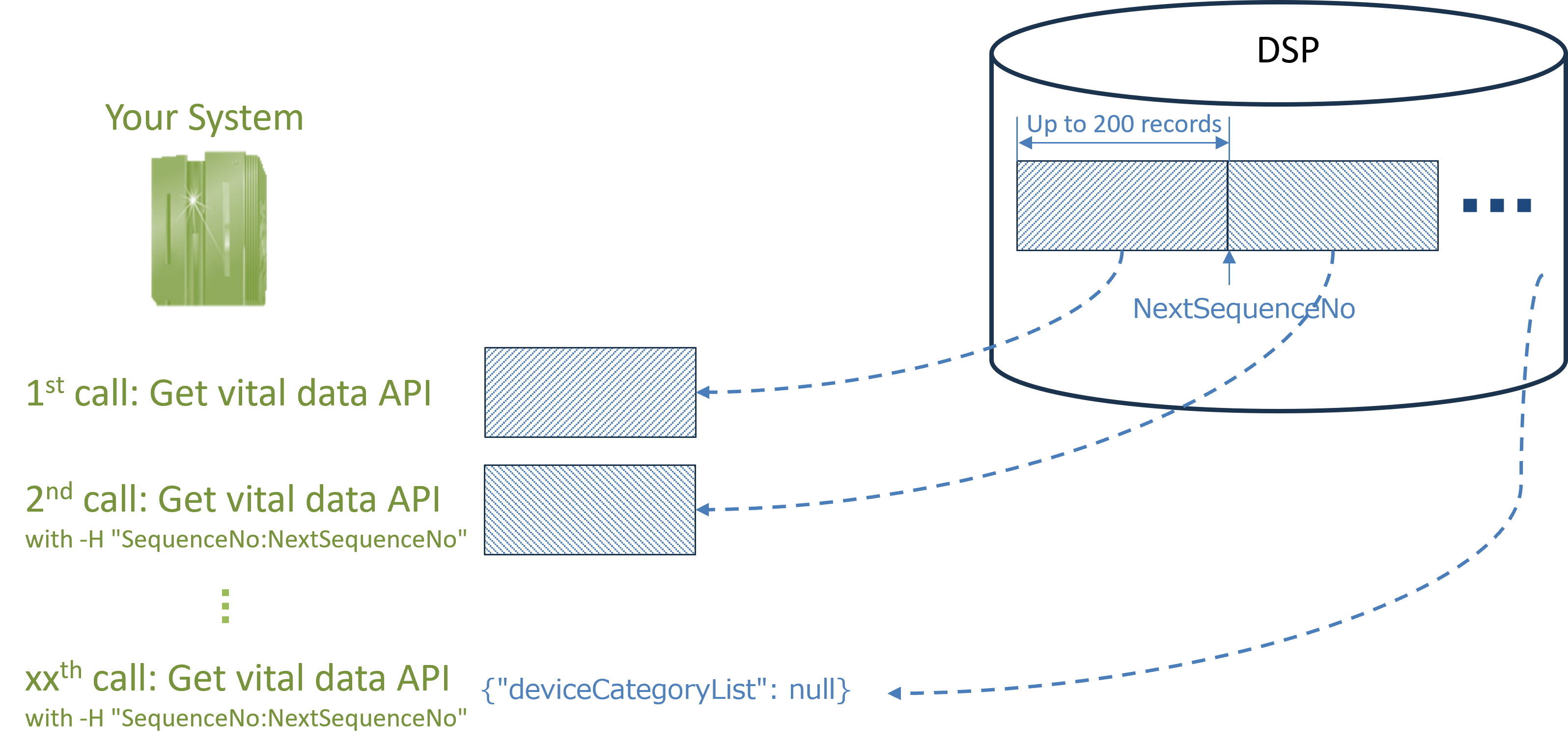
Note: Vital data is stored in the DSP in the order it is registered, and each entry is assigned a SequenceNo at the time of registration. If you retrieve vital data using a measurement timestamp (via the SearchDateFrom parameter), there is a risk of missing some data due to potential delays or discrepancies in registration timing.
Example Scenario: Risk of Missing Vital Data When Using SearchDateFrom
- January 2, 12:00 AM
You call the API with SearchDateFrom = January 1, 12:00 AM.
→ The API returns all vital data registered up to January 1, 11:59 PM. - January 1, 10:00 AM
An end user measures their vitals, but due to certain circumstances, the data is not immediately uploaded to the OMRON connect cloud. - January 2, 10:00 AM
The vital data measured on January 1, 10:00 AM is finally uploaded to the cloud. - January 3, 12:00 AM
You call the API again with SearchDateFrom = January 2, 12:00 AM.
→ The data measured on January 1 (but uploaded late) will not be included, as it falls outside the specified date range.
To ensure complete and accurate data retrieval, it is recommended to use the 'SequenceNo' when calling this API.
| NextSequenceNo | long Sequence no. when searching next 200 cases. |
| PartnerList | object array4 Information regarding partner |
| PartnerId | string Partner ID |
| PartnerName | string Partner’s name |
| GroupList | object array4 Information regarding group(multiple return) |
| GroupId | string Group ID |
| GroupName | string Group name |
| UserList | object array4 Information regarding user(multiple return) |
| UserId | string OMRON connect ID |
| deviceCategoryList | object array4 Measured data as per device category (multiple return) |
| deviceCategory | int Device category |
| deviceModelList | object array4 Measured data as per device model |
| deviceModel | string Device model |
| deviceSerialIDList | object array4 Measured data as per device serial ID |
| deviceSerialID | string Device serial ID ※In case of manually input data, it will be "0000000000000000". |
| userNumberInDevice | int User’s device using no. |
| measureList | object array4 Measured data as per date & time. Refer to the next page for information which is included in measureList |
| bodyIndexList | object5 Measured data by device |
| decisionFlag | int Decision flag. Flag indicates the status of measured data |
| deleteFlag | int Flag that indicates the deleted data (0:Undeleted, 1:deleted) |
| deviceModel | string Device model |
| deviceSerialID | string Device serial ID |
| measureDateFrom | long6 Measurement start date (UnixTime milliseconds format) |
| measureDeviceDateFrom | string6 Measurement start date in device (YYYYMMDDHHMMSSsss) |
| userNumberInDevice | int User’s device using number |
| userUpdateDate | long6 Update date of measured data (UnixTime millisecond format) |
| informationList | object Supplementary information |
| measureDateTo | long6 Measurement end date (UnixTime millisecond format) |
| measureDeviceDateTo | string6 Measurement end date in device (YYYYMMDDHHMMSSsss) |
| timeZone | string Time zone of update/measured date and time |
| transferDate | long6 Transferred date & time in between Device and OMRON connect app (UnixTime millisecond format) |
| correctedDateTimeFlag | int Measurement date and time correction flag (2: corrected) |
4:About the value of the object array type parameter. The values of these parameters will be an array if there are multiple data. If there is only one, it will not be an array.
5:In the index list (bodyIndexLIst), the index is stored in object form. Measured data, unit and index are the type of string. Index name: [measured data, unit, index, sequence no., time division data].
・Arbitrary data may be included in the elements thereafter the time division data.
・Indicators that do not have time-division data, does not include time division data.
・Regarding the details of time division data, refer to FAQ.
・For index name and setting value, refer to each page for devices.
6:About items containing milliseconds
The valid range of values for these items is up to seconds. Do not use the last 3 digits of the milliseconds value.
This is because the last 3 digits of the millisecond value may include device control information, etc., and has nothing to do with the user's measurement behavior.
Response Status Code (Sample)
| Value | Description |
|---|---|
| 200 | Success |
| 400 (Bad Request) | Example: "Insufficient / invalid request header" "Invalid request parameter" "URL is wrong" "When the size of the response data exceeds 5MB" |
| 401 | Example: "Authentication Failure" |
| 405 | Example: "Method Not Allowed" |
| 500 | Example: "Internal Server Error" |
(if needed) Get a refresh token
curl -v -X POST \
-H "Content-Type: application/json" \
  "https://{authentication server domain}/oauth2/token" \
  -d '{
        "grant_type": "refresh_token",
        "refresh_token": "{REFRESH_TOKEN}"
      }'
{
"id" : USER_ID,
"access_token" : {ACCESS_TOKEN},
"refresh_token" : {REFRESH_TOKEN}
"expires_in" : 864000,
"token_type" : "bearer"
}Request Header and Body Parameters
| Endpoint | https://{authentication server domain} 1/oauth2/token |
| Method | POST |
| Header | Content-Type required | string Specify "application/json". |
| Body | grant_type required | string Specify “refresh_token”. |
| refresh_token required | string Refresh token when access token is acquired |
Response Parameters
| id | string A unique ID that identifies the account in the B2BDSP. |
| access_token | string New access token |
| refresh_token | string refresh token The expiration date of the refresh token is 10 years, and the same value will be returned during the validity period. If it has expired, an error(status code:400) will be returned. |
| expires_in | long Expiration date of access token(Seconds) |
| token_type | string Type of token |
How to Retrieve ECG Data
The ECG waveform(atc file) will be obtained in zip format.
Note:The ECG data (Waveform) is stored in files with the '.atc' extension. This format is based on AliveCor’s proprietary specifications. For detailed information regarding the specifications, please contact AliveCor directly.curl -i -X GET
-H "Authorization:bearer eyJraWQiOiJWSnZQdmYrTEtyQlQx…" \
-H "MyLoginName:test1234" \
-H "DeviceCategory:b_16" \
-H "ClientApplicationId:1" \
-H "DeviceModel:AB-cd_0.1" \
-H "DeviceSerialId:1234567890" \
-H "UserNumberInDevice:1" \
-H "MeasureDateFrom:9999999999999" \
'https://{B2BDSP server domain}/a/b2b-data-api/v1.0/wps/17/xxxxxxxx-xxxx-xxxx-xxxx-xxxxxxxxxxxx/partners/yyyyyyyy-yyyy-yyyy-yyyy-yyyyyyyyyyyy/groups/zzzzzzzzzzzz/users/aaaaaaaaaaaa-aaaa-aaaa-aaaa-aaaaaaaa/vital-signs/base64'{
"DataEncoding":"base64",
"DataType":"application/zip",
"Data":"UEsDBAoAAAAAAF1/zVaD…"
}Request Header and Request Parameters
7:"B2BDSP server domain", "WP-ID", and "Partner ID" will be offered after signing the contracts.
8:"Group ID" and "OMRON connect ID" can be found on the admin portal site.
| Header | Authorization required | string Valid access token “bearer “ + access token |
| MyLoginName required | string Login name when access token is acquired | |
| DeviceCategory | string When acquiring an ECG file, 'b_16' is fixed. | |
| ClientApplicationId | long A number between 0 and 3. ※Specify clientApplicationID of vital data. | |
| DeviceModel | string Specify the value of deviceModel of vital data. | |
| DeviceSerialId | string Specify the value of deviceSerialIDList for vital data. | |
| UserNumberInDevice | int Numeric value from 1 to 4. (Specify the value of userNumberInDevice of vital data) | |
| MeasureDateFrom | long Unixtime milliseconds ※Specify the value of measureDateFrom of vital data. |
Response Status Code (Sample)
| Value | Description |
|---|---|
| 200 | Success |
| 400 (Bad Request) | Insufficient / invalid request header, Invalid request parameter, URL is wrong, When the size of the response data exceeds 5MB, etc. |
| 401 (Unauthorized) | Authentication Failure, etc. |
| 404 (Not Found) | Specified file does not exist, etc. |
| 405 (Method Not Allowed) | Method Not Allowed, etc. |
| 500 (Internal Server Error) | Internal Server Error, etc. |
Response Data Structure
| Key | Description |
|---|---|
| DataEncoding | string Fixed to 'base64'. |
| DataType | string Fixed to 'application/zip'. |
| Data | string A string obtained by base64 encoding the zip file that compressed the ECG file. |
Group Deregistration Steps
If you want to stop data integration for a specific user from the DSP—for example, when the user cancels their subscription to the linked service—you can use this API to remove them from the group, thereby stopping the data integration for that user.
Step1: Get an access token
curl -v -X POST \
-H "Content-Type: application/json" \
  "https://{authentication server domain}/oauth2/token" \
  -d '{
        "grant_type": "password",
        "username": "user_123456",
        "password": "123ABC"
      }'
{
"id" : USER_ID,
"access_token" : {ACCESS_TOKEN},
"refresh_token" : {REFRESH_TOKEN},
"expires_in" : 2147483647,
"token_type" : "bearer"
}Request Header and Body Parameters
| Endpoint | https://{authentication server domain} 1/oauth2/token |
| Method | POST |
1:Authentication server domain will be presented by OMRON Healthcare.
| Header | Content-Type required | string Specify “application/json” |
| Body | grant_type required | string Specify "password”. |
| username required | string Specify username for partner or group account. | |
| password required | string Specify password for partner or group account. |
Response Parameters
| id | string A unique ID that identifies the account in the B2BDSP. |
| access_token | string Access token |
| refresh_token | string Refresh token Refresh tokens are valid for 10 years. |
| expires_in | long Expiration date of access token(Seconds) |
| token_type | string Type of token |
Response Status Code (Sample)
| Value | Description |
|---|---|
| 200 | Success |
| 400 (Bad Request) | Example: "Invalid request parameter" "URL is wrong" "Authentication failure" |
| 404 (Not Found) | Example: "Request resource not found" |
| 500 | Example: "Internal Server Error" |
Group Deregistration
curl -i -X DELETE
  -H "Authorization:bearer xdrgPxxjHV2brPBu8aQ_XrrYI-ymVORNS3dwap9wM74" \
  -H "MyLoginName:XXX111" \
  'https://{B2B Data service platform server domain}/a/b2b-data-api/v1.0/groups/5/{Group ID}/users/{OMRON connect ID}'
Request Header and Request Parameters
| Method | DELETE | |
| Header | Authorization required | string Valid access token “bearer “ + access token |
| MyLoginName required | string Login name when access token is acquired |
Response Status Code (Sample)
| Value | Description |
|---|---|
| 200 | Success |
| 400 (Bad Request) | Example: "Invalid request header" "URL is wrong" "The size of the response data exceeds 5MB" |
| 401 (Unauthorized) | Example: "Authentication failure" |
| 405(Method Not Allowed) | Example: "Invalid method" |
| 500 | Example: "Internal Server Error" |
Updated 3 months ago