
FAQ
rev.1.5
About API
Q. The server returns a '403 Forbidden' or '404 Not Found' error response.
A. '404 Not Found' error may indicate that access is being attempted from an unregistered IP address. '403 Forbidden' error, on the other hand, is more likely to suggest that the DSP is unreachable.
'404' error can be related to access from an unregistered IP address. We kindly ask that you review the IP address. Please note that access through proxy servers or from IPv6 addresses is not permitted.
And, '403' error has been related to internal network DNS resolution issues in the past case. We kindly ask that you review your network configuration.
If the issue remains unresolved, please contact us. When doing so, providing details such as the source IP address, the requested API, request headers and parameters, and the response result will greatly assist in our investigation.
About SFTP
Q. How is data delivered over SFTP?
A. Data is provided per user and device category.
[{"PartnerId":"a791xpp1-cb4a-11e7-ad25-0a669524e191",
  "PartnerName":"sample partner",
  "GroupId":"p2xhki12x0zk",
  "GroupName":"sample group1",
  "deviceCategory":"0",
  "UserId":"191e612349x8-9218-7e11-0c1a-Xax0a12c",
  "measureList":[omit]
},
{"PartnerId":"a791xpp1-cb4a-11e7-ad25-0a669524e191",
  "PartnerName":"sample partner",
  "GroupId":"p2xhki12x0zk",
  "GroupName":"sample group1",
  "deviceCategory":"0",
  "UserId":"210a1289679a0-7821-5a32-1d2z-Iad3g77p",
  "measureList":[omit]}]
[{"PartnerId":"a791xpp1-cb4a-11e7-ad25-0a669524e191",
"PartnerName":"sample partner",
"GroupId":"p2xhki12x0zk",
"GroupName":"sample group1",
"deviceCategory":"0",
"UserId":"191e612349x8-9218-7e11-0c1a-Xax0a12c",
"measureList":[omit]
},
{"PartnerId":"a791xpp1-cb4a-11e7-ad25-0a669524e191",
"PartnerName":"sample partner",
"GroupId":"p2xhki12x0zk",
"GroupName":"sample group1",
"deviceCategory":"1",
"UserId":"191e612349x8-9218-7e11-0c1a-Xax0a12c",
"measureList":[omit]}]Q. How is data for each device delivered via SFTP?
A. For blood pressure monitors, body composition scales, basal thermometers, general thermometers, and pulse oximeters, each measurement is treated as one data element. For pedometers and sleep monitors, one day's worth of measurements is treated as one data element.
For blood pressure monitors, each measurement is represented as one element in the measureList. If two measurements are taken in a day, the measureList will contain two elements.
Example of data measured by a blood pressure monitor
[ {"PartnerId":"a791xpp1-cb4a-11e7-ad25-0a669524e191", "PartnerName":"sample partner",
   "GroupId":"p2xhki12x0zk", "GroupName":"sample group1",
   "deviceCategory":"0",
   "UserId":"191e612349x8-9218-7e11-0c1a-Xax0a12c",
   "measureList":[{"_created":1506323466522,
                   "_dataType":"application/json",
                   "_id":"HEM-6324T_00000094002d11020a916900ffff_1_1506316575000",
                   "_modified":1506323466522,
                   "_owner":"191e612349x8-9218-7e11-0c1a-Xax0a12c",
                   "_version":"1",
                   "deviceModel":"HEM-6324T",
                   "deviceSerialID":"00000094002d11020a916900ffff",
                   "userNumberInDevice":1,
                   "measureDeviceDateFrom":"20170925230935000",
                   "measureDateFrom":1506316575000,
                   "userUpdateDate":1506323263000,
                   "informationList":{"timeZone":"Asia/Tokyo",
                                      "measureDateTo":1506316575000,
                                      "measureDeviceDateTo":"20170925230935000",
                                      "transferDate":1506316575000},
                   "bodyIndexList":{"1":["130","20496","0","0"],
                                    "2":["87","20496","0","0"],
                                    "3":["71","61600","0","0"],
                                    "4":["0","0","0","0"],
                                    "6":["0","0","0","0"],},
                   "deleteFlag":0}]}]
[ {"PartnerId":"a791xpp1-cb4a-11e7-ad25-0a669524e191", "PartnerName":"sample partner",
"GroupId":"p2xhki12x0zk", "GroupName":"sample group1",
"deviceCategory":"0",
"UserId":"191e612349x8-9218-7e11-0c1a-Xax0a12c",
"measureList":[{Measured data of first time},
{Measured data of second time}]}]Example of data measured by a pedometer
[ {"PartnerId":"a791xpp1-cb4a-11e7-ad25-0a669524e191","PartnerName":"sample partner",
   "GroupId":"p2xhki12x0zk","GroupName":"sample group1",
   "deviceCategory":"2",
   "UserId":"191e612349x8-9218-7e11-0c1a-Xax0a12c",
   "measureList":[{"_owner":"191e612349x8-9218-7e11-0c1a-Xax0a12c",
                   "bodyIndexList":{omit},
                   "userNumberInDevice":1,
                   "_dataType":"application/json",
                   "informationList":{"timeZone":"Asia/Tokyo",
                                      "measureDateTo":1510876800000,
                                      "measureDeviceDateTo":"20171117000000000",
                                      "transferDate":1511925376000},
                   "decisionFlag":100,
                   "userUpdateDate":1511925426000,
                   "deleteFlag":0,
                   "measureDeviceDateFrom":"20171117000000000",
                   "_created":1511925444895,
                   "deviceModel":"HJA-405T",
                   "deviceSerialID":"000300940009100c1c398b00ffff",
                   "_id":"HJA-405T_000300940009100c1c398b00ffff_1_1510876800033",
                   "_version":"1",
                   "_modified":1511925444895,
"measureDateFrom":1510876800033}]}]Q. When are the files generated in the case of SFTP?
A. The following table outlines the delivery times by region.
| Region | Time | |
|---|---|---|
| Staging | Japan | 6:00am (JST) |
| Production | Japan | 6:00am (JST) |
| Europe | 4:00am (UTC) | |
| Singapore | 5:00am (SST) | |
| India | 7:30am (IST) |
Q. When blood pressure is measured twice in a day, how is the data delivered through SFTP?
A. When uploaded on the same day, both measurements will be included in the delivery file generated the next day.
- Data Upload Scenario 1: Two Blood Pressure Measurements on September 20
[{"PartnerId":"a791xpp1-cb4a-11e7-ad25-0a669524e191",  "PartnerName":"sample partner",
  "GroupId":"p2xhki12x0zk",  "GroupName":"sample group1",
  "deviceCategory":"0",
  "UserId":"191e612349x8-9218-7e11-0c1a-Xax0a12c",
  "measureList":[{"_created":1505898493391, "_dataType":"application/json", "_id":"HEM-6324T_00000094002d11020a916900ffff_1_1505855649000",
                  "_modified":1505898493391, "_owner":"191e612349x8-9218-7e11-0c1a-Xax0a12c", "_version":"1",
                  "deviceModel":"HEM-6324T", "deviceSerialID":"00000094002d11020a916900ffff",
                  "userNumberInDevice":1,
                  "measureDeviceDateFrom":"20170920060935000",
                  "measureDateFrom":1505855649000,
                  "userUpdateDate":1505898491000,
                  "informationList":{"timeZone":"Asia/Tokyo", "measureDateTo":1505916575000,
                               "measureDeviceDateTo":"20170920060935000", "transferDate":1505898176000},
                  "bodyIndexList":{"1":["130","20496","0","0"], "2":["87","20496","0","0"], "3":["71","61600","0","0"], "4":["3","0","0","0"],
                                   "6":["0","0","0","0"], "7":["0","0","0","0"], "8":["0","0","0","0"], "10":["0","0","0","0"]},
                  "deleteFlag":0},
                {"_created":1505898493391, "_dataType":"application/json", "_id":"HEM-6324T_00000094002d11020a916900ffff_1_1505895136000",
                  "_modified":1505898493391, "_owner":"191e612349x8-9218-7e11-0c1a-Xax0a12c", "_version":"1",
                  "deviceModel":"HEM-6324T", "deviceSerialID":"00000094002d11020a916900ffff",
                  "userNumberInDevice":1,
                  "measureDeviceDateFrom":"20170920171216000",
                  "measureDateFrom":1505895136000,
                  "userUpdateDate":15058984910000,
                  "informationList":{"timeZone":"Asia/Tokyo", "measureDateTo":1505895136000,
                               "measureDeviceDateTo":"20170920171216000", "transferDate":1505898176000},
                  "bodyIndexList":{"1":["143","20496","0","0"], "2":["103","20496","0","0"], "3":["78","61600","0","0"], "4":["3","0","0","0"],
                                   "6":["0","0","0","0"], "7":["0","0","0","0"], "8":["0","0","0","0"], "10":["0","0","0","0"]},
                  "deleteFlag":0}]}]
The first data including '"measureDateFrom":1505855649000' was measured on 6:14am 20th September 2017(JST). The second data including '"measureDateFrom":1505895136000' was measured on 5:12pm 20th September 2017(JST).
- Data Upload Scenario 2: Two Measurements in One Day with Separate Data Uploads
[{"PartnerId":"a791xpp1-cb4a-11e7-ad25-0a669524e191", "PartnerName":"sample partner",
  "GroupId":"p2xhki12x0zk", "GroupName":"sample group1",
  "deviceCategory":"0",
  "UserId":"191e612349x8-9218-7e11-0c1a-Xax0a12c",
  "measureList":[{"_created":1505879300391, "_dataType":"application/json", "_id":"HEM-6324T_00000094002d11020a916900ffff_1_1505855649000",
                  "_modified":1505879300391, "_owner":"191e612349x8-9218-7e11-0c1a-Xax0a12c", "_version":"1",
                  "deviceModel":"HEM-6324T", "deviceSerialID":"00000094002d11020a916900ffff",
                  "userNumberInDevice":1,
                  "measureDeviceDateFrom":"20170920060935000",
                  "measureDateFrom":1505855649000,
                  "userUpdateDate":1505879300000,
                  "informationList":{"timeZone":"Asia/Tokyo", "measureDateTo":1505916575000,
                                     "measureDeviceDateTo":"20170920060935000", "transferDate":1505879131000},
                  "bodyIndexList":{"1":["130","20496","0","0"], "2":["87","20496","0","0"], "3":["71","61600","0","0"], "4":["3","0","0","0"],
                                   "6":["0","0","0","0"], "7":["0","0","0","0"], "8":["0","0","0","0"], "10":["0","0","0","0"]},
                  "deleteFlag":0}]}]
After the first blood pressure measurement at 6 a.m. on September 20(JST), the data was transferred and uploaded. The second measurement was taken at 5 p.m. on the same day, and its data was transferred and uploaded at 8 a.m. on September 21(JST).
In this case, only the first measurement is included in the file, because at the time the file was generated, the second measurement data had not yet been uploaded.
The second measurement is included in the file created on September 22 (JST).
Q. When pedometer or activity tracker is uploaded twice in a day, how is the data delivered through SFTP?
A. Data is consolidated into a single file for each 24-hour period.
Q. When is Electrocardiograph data provided by SFTP provided?
A. Electrocardiograph data is provided when 'ECG data' and 'Waveform data' are available.
Ex.1) In case of new data registered
- Pattern 1:
- ECG data is uploaded to OGSC Cloud at 12:01.
- Waveform data is uploaded to OGSC Cloud at 12:31.
- ->ECG data/Waveform data will be provided at 13:00.
- Pattern 2:
- Waveform data is uploaded to OGSC Cloud at 12:01.
- ECG data is uploaded to OGSC Cloud at 13:31.
- ->ECG data/Waveform data will be provided at 14:00.
- Pattern 3:
- ECG data is uploaded to OGSC Cloud at 12:01.
- Waveform data is uploaded to OGSC Cloud at 14:01.
- ->ECG data/Waveform data will be provided at 15:00.
Ex.2) In case of the data updated (ECG data may be updated. Waveform data is never updated.)
- Pattern 1:
- When ECG data is updated at 13:31 while ECG data/waveform data have already been uploaded to OGSC Cloud and provided.
- ->ECG data/Waveform data will be provided at 14:00. (Data that are not updated are also provided.)
- Pattern 2:
- ECG data is uploaded to OGSC Cloud at 11:01.(ECG data 1)
- Waveform data is uploaded to OGSC Cloud at 11:31.
- ECG data is uploaded to OGSC Cloud at 11:32.(ECG data 2)
- ->ECG data 2/Waveform data will be provided at 12:00. (Only the latest data will be provided.)
About Group
Q. What is the maximum number of OMRON connect users that can be registered to a group?
A. The recommended number of users per group is approximately 5,000.
If the number of users in a group exceeds 5,000, it may cause issues such as slower API response times. In cases where there are more than 5,000 users (participants), it is recommended to divide them into multiple groups for management.
Additionally, when retrieving vital data via the API, please create a separate administrator account for each group and use that account to access the data for its respective group. Attempting to retrieve data from multiple groups simultaneously using a single administrator account may trigger the DSP’s WAF (Web Application Firewall) to interpret it as a DoS attack, resulting in errors in the response and potential failure to obtain vital data.
About Time-Division Data
Q. What kind of data is "time-division data" included in the index list included in the measurement data for each measurement date and time?
A. "Hourly Data" is the data structure for pedometer, activity tracker or sleep tracker to have data measured every hour.
"Start time of the period" is in the Unixtime format and UTC+0 time zone.
supplement information
The sample shows an example of how to understand it.
513 : ["24276", "61536", "0", "0",						← No. of steps in the day
  [
    ["1000", 1470787200000, 60, [[0, 60, "1000"]]],	← No. of steps from 0:00:00 to 0:59:59
    ["1001", 1470790800000, 60, [[0, 60, "1001"]]],	← No. of steps from 1:00:00 to 1:59:59
    ["1002", 1470794400000, 60, [[0, 60, "1002"]]],	・
    ["1003", 1470798000000, 60, [[0, 60, "1003"]]],	・
    ["1004", 1470801600000, 60, [[0, 60, "1004"]]],	・
    ["1005", 1470805200000, 60, [[0, 60, "1005"]]],	・
    ["1006", 1470808800000, 60, [[0, 60, "1006"]]],	・
    ["1007", 1470812400000, 60, [[0, 60, "1007"]]],	・
    ["1008", 1470816000000, 60, [[0, 60, "1008"]]],	・
    ["1009", 1470819600000, 60, [[0, 60, "1009"]]],	・
    ["1010", 1470823200000, 60, [[0, 60, "1010"]]],	・
    ["1011", 1470826800000, 60, [[0, 60, "1011"]]],	・
    ["1012", 1470830400000, 60, [[0, 60, "1012"]]],	・
    ["1013", 1470834000000, 60, [[0, 60, "1013"]]],	・
    ["1014", 1470837600000, 60, [[0, 60, "1014"]]],	・
    ["1015", 1470841200000, 60, [[0, 60, "1015"]]],	・
    ["1016", 1470844800000, 60, [[0, 60, "1016"]]],	・
    ["1017", 1470848400000, 60, [[0, 60, "1017"]]],	・
    ["1018", 1470852000000, 60, [[0, 60, "1018"]]],	・
    ["1019", 1470855600000, 60, [[0, 60, "1019"]]],	・
    ["1020", 1470859200000, 60, [[0, 60, "1020"]]],	・
    ["1021", 1470862800000, 60, [[0, 60, "1021"]]],	・
    ["1022", 1470866400000, 60, [[0, 60, "1022"]]],	・
    ["1023", 1470870000000, 60, [[0, 60, "1023"]]]	← No. of steps from 23:00:00 to 23:59:59
  ]
]
513 : ["4006", "61536", "0", "0",	← No. of steps in the day
  [
    ["1000", 1470873600000, 60, [[0, 60, "1000"]]],	← No. of steps from 0:00:00 to 0:59:59
    ["1001", 1470877200000, 60, [[0, 60, "1001"]]],	← No. of steps from 1:00:00 to 1:59:59
    ["1002", 1470880800000, 60, [[0, 60, "1002"]]],
    ["1003", 1470884400000, 60, [[0, 60, "1003"]]],
    ["0", 1470888000000, 60, [[0, 60, "0"]]],
    ・・・・
    ["0", 1470956400000, 60, [[0, 60, "0"]]]		← No. of steps from 23:00:00 to 23:59:59
  ]
]
Line 3 in Sample1: ["1000", 1470787200000, 60, [[0, 60, "1000"]]],
1470787200000 is the time division measurement start time.
This value is
"2016/08/10 (Wednesday) 09:00:00" in JST
"2016/08/10 (Wednesday) 00:00:00" in UTC
Step count timestamps are handled in UTC time, so the above data represents step count data from the 0:00 hour in Japan.
1031 : ["1080", "0", "0", "0",
  [
    ["1080",1468335900000,370,[[0,5,"2"],[5,5,"2"],[10,5,"0"],[15,5,"1"],[20,5,"2"],[25,5,"2"],[30,5,"0"],[35,5,"1"],[40,5,"2"],・・・[360,5,"0"],[365,5,"0"]]]
  ]
]
Length of period is actual sleep time + maximum 10 minutes1.
1:Data for "Body Movement Level" starts 5 minutes. Length of the period includes first 5 minutes of sleep and last 5 minutes of sleep.
Measure data and total of value in day('1080' in Sample3) are the total time when the body movement level during sleep measurement is 0, and the unit is "minutes".
About Admin Portal
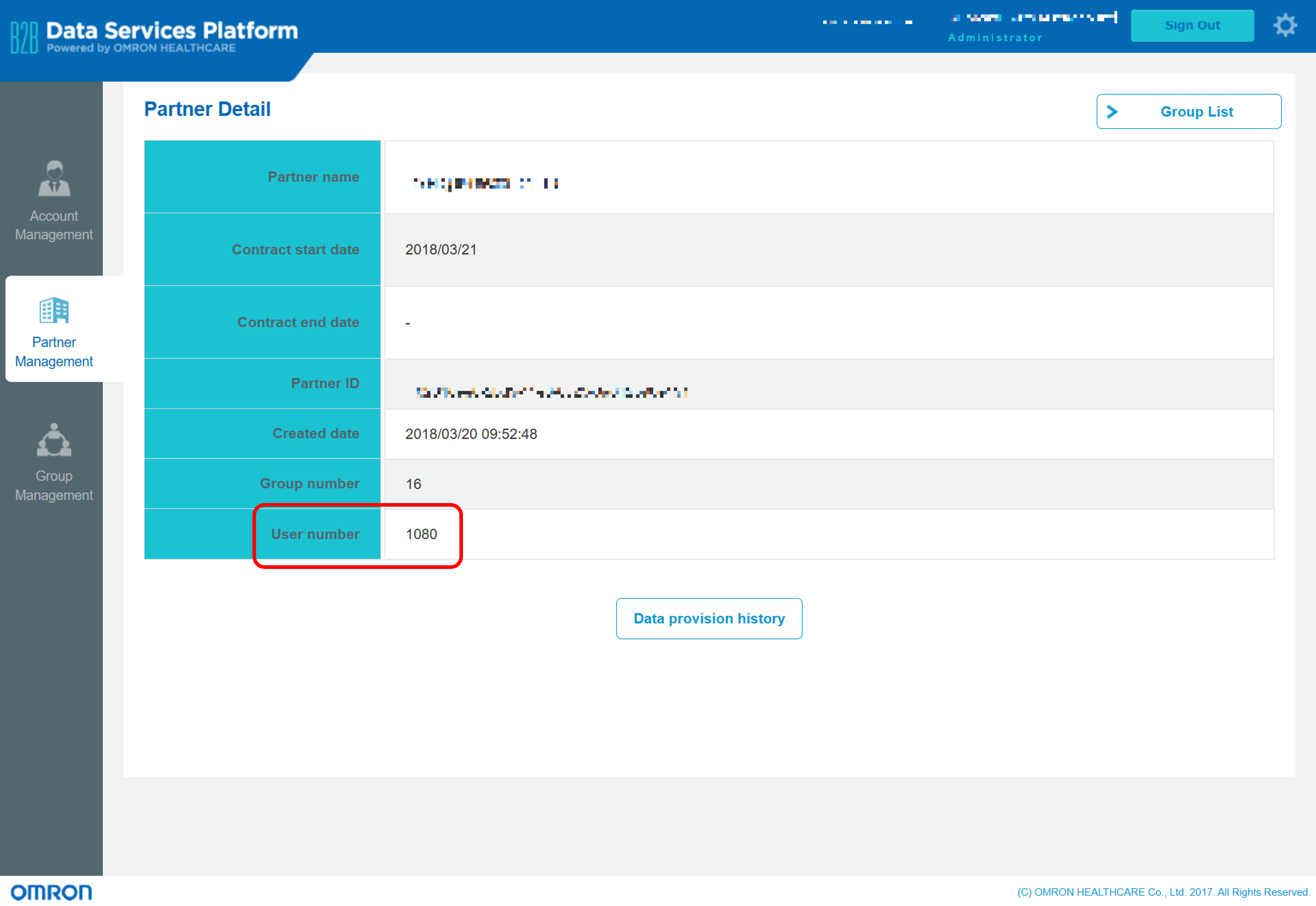
Q. How is the 'User number' displayed in Partner Management calculated?
A. End users who belong to multiple groups are counted as separate users for each group, rather than as a single user. Additionally, users who have left from the OGSC Cloud while still belonging to a group are not included in the count.
Q. When accessing the admin portal, it shows 'The requested destination does not exist (404)'.
A. Access may be originating from an unregistered IP address.
Kindly ensure that the connection is being made from a registered global IPv4 address.
Additionally, please verify whether your internal network settings are configured to route access to certain domains through a proxy server.
If the issue persists, please contact us with access log details, including the date and time of access, the source IP address, and a screenshot of the error page.
About Decision Flag
Q. What is the 'DecisionFlag'?
A. This flag identifies the confirmation status of the measurement data.
Measurement timestamps in the pedometer category are handled differently compared to other data categories.

For categories other than pedometers—such as blood pressure monitors, body composition monitors, and sleep trackers—data is generated with each measurement. The measurement start time is identical to the time of measurement. Once recorded, the data is not updated by subsequent measurements.
In the pedometer category, data is generated on a daily basis. The measurement start time is set to 00:00 of the corresponding date. If multiple measurements are taken on the same day, the data is updated accordingly.
Pedometers store a value known as 'Serial Date', which indicates the number of days since the user began using the device. This value increases by one at midnight each day. Changing the device’s date and time settings does not affect the serial date for that day.
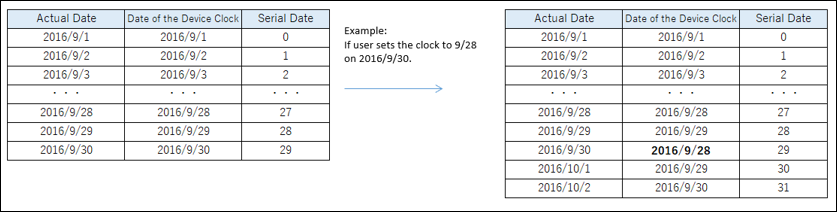
However, due to device malfunctions, the 'Serial Date' may be reset. When a reset occurs, the value does not necessarily restart from zero, and the starting value is undefined.
In the pedometer category, the 'Serial Date' is stored as the fourth element in the indicator list, serving as a sequence number. Additionally, the last three digits of the measurement start timestamp represent the remainder when the 'Serial Date' is divided by 1000.
Criteria for identifying valid data
In the pedometer category, data for the current day is finalized at the point when the date rolls over to the next day. After the date rolls over, the DecisionFlag is set to 100; before the rollover, it remains at 1.
If the data becomes invalid due to changes in the device’s date and time settings, the DecisionFlag is set to 0 to indicate invalid data.
In the example below, it is recommended to discard the data entry for September 6, 2016 with 30 steps in the right-hand table, as its DecisionFlag is set to 0 (Invalid).
In cases where multiple pedometer data entries exist for the same measurement date, it is advisable to use the entry with the larger measurement start timestamp.
If 'Serial Date's are duplicated, the data with the higher step count is considered valid, while the data with the lower step count is treated as invalid.
In cases where two entries exist for the device date of September 4, it is recommended to adopt the entry with the larger serial date value.In the example shown below, there are two entries with the 'Date of the Device Clock' as September 4, 2016. It is recommended to select the one with the larger (3 < 5) 'Serial Date'.

About DSP usage
Q. We intend to configure our internal network so that access via a fixed IP address is restricted exclusively to the DSP domain. Can you provide the exact domain name or endpoint used to connect to the DSP?
A. The domain used to access the DSP is as follows.
| Region | Domain | |
|---|---|---|
| Staging | Japan | .odhpf.mobi .omronconnect.mobi |
| Production | Japan | .odhpf.com .omronconnect.com |
| Europe | .odhpf.com .omronconnect.com | |
| Singapore | .odhpf.com .omronconnect.com | |
| India | .odhpf.com .omronconnect.com |
Updated 8 months ago