
B2B Data Service Platform (DSP) Integration
rev.1.5
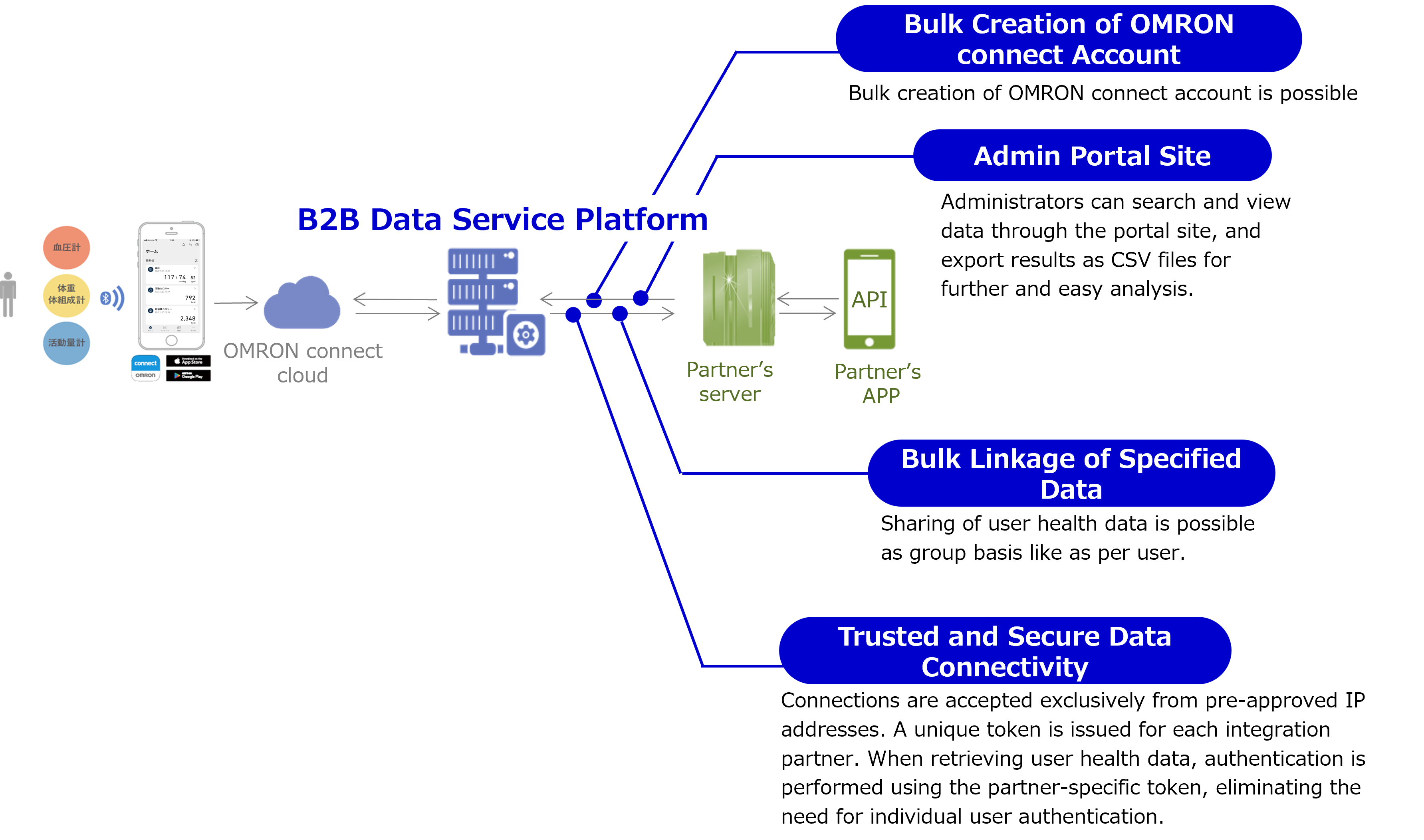
Onboarding and Consent Flow
1. Introduction
This document outlines the process by which customers can enroll in your program and authorize the sharing of their health data1—such as blood pressure and weight measurements—collected via OMRON connect, with your organization.
It is intended for two key stakeholder groups:
- Business / Operations Teams: To gain a clear understanding of the customer journey, including consent protocols and user experience considerations.
- Engineering Teams: To review the technical architecture, data flow, and API integration requirements necessary for implementation.
1: ECG data measured with supported electrocardiographs can also be shared. Please refer to the API, SFTP, and Admin Portal documentation pages for detailed information regarding the retrieval of ECG data. Please feel free to contact us if you have other question.
2. Customer Enrollment Methods: Two Approaches to Join the Program
2.1 Pre-Created Account
In this onboarding approach, your organization initiates the enrollment process by pre-registering participants:
- Your team provisions the participant’s account in advance via the admin portal site (dashboard).
- A unique login ID and password are generated for each participant.
- These credentials are delivered to the participants.
- The participant uses the provided credentials to access the program.
This method is particularly suitable for controlled enrollment scenarios, such as pilot studies or invitation-only programs.
2.2 Existing OMRON connect Users
Customers who are already using OMRON devices and possess an active OMRON connect account can enroll in the program seamlessly.
Participation requires only that they provide consent to share their previously collected health data with your organization.
A detailed overview of the consent workflow is provided in the following section.
3. Consent Flow
Step1 - Invitation to Provide Consent
- OMRON Healthcare will supply a dedicated URL tailored specifically for your program.
- You are responsible for delivering this unique URL to the customer.
- It may be distributed via email, presented as a QR code during the onboarding process, or
- Integrated into your mobile application (e.g., behind a “Join Program” button).
Step2 - Authentication via OMRON connect
Upon accessing the URL:
- The customer will be directed to a web page prompting them to sign in using their OMRON connect account credentials.
- They must enter the email/username and password associated with their OMRON connect account.
Step3 - Display of Consent Screen
Immediately following successful authentication, the consent screen will be presented.
- This screen outlines that the customer’s health data will be shared with a designated third party—namely, your organization.
- A clearly emphasized section will display your project or company name, ensuring the customer is fully informed about the recipient of their data.
- The customer may then proceed to formally accept and provide their consent.
1: 'OMRON connect domain' is provided by OMRON.
2: 'group ID' can be shown in Admin Portal Site. Please refer to Group Details in 'Admin Portal Site'.
3: 'Redirect destination URL' from the consent page of your app can be set as per group. Also, the URL must be pre-registered in the DSP. If you do not need custom settings for the redirect destination, specify the URL: https://[OMRON connect domain]/app/oauth2-frontend/static/result.html
4: Setting for specifying the transfer destination page from the sign-in page of your app is optional. Specify the 'Transfer destination page' in Rison format, and do not specify any parameters other than those listed below:
e.g. &custom_params=display_back:1,back_url:'',back_url_params:''
- display_back: Display setting for back button (Set "1" for display)
- back_url: Specify URL of transfer destination (enclose URL in single quotation mark)
- back_url_params: Enter the parameter for the URL specified in back_url (param1:a,param2:b, ...)
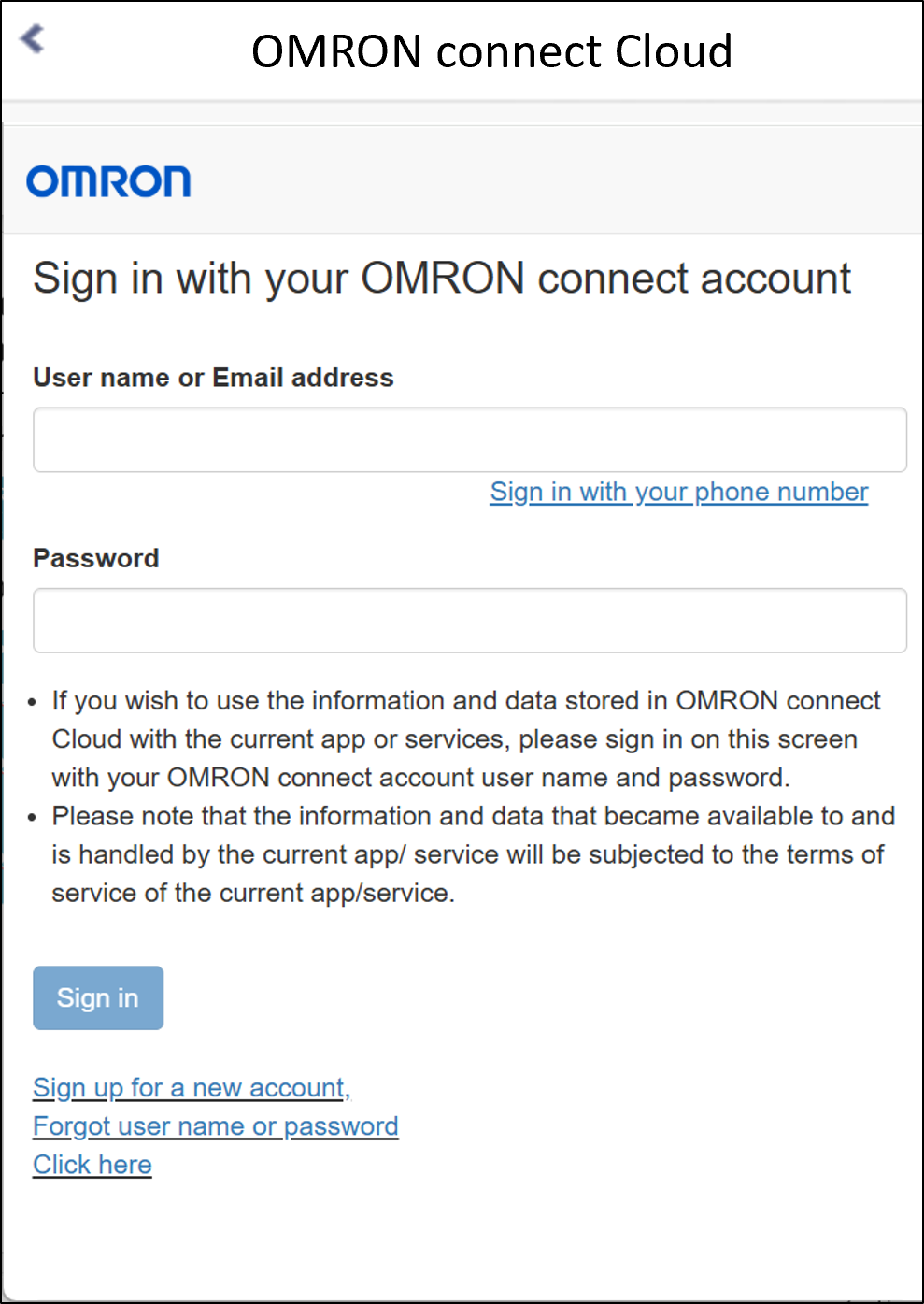
When display_back:1 is specified in the URL parameter, a header is displayed at the top of the sign-in page, and it is possible to transit pages from the icon on the left side of the header.
4. Redirection to Your Website
Following the end-user's consent:
- The end-user is automatically redirected to the website URL that has been pre-registered in the DSP system. This may be your corporate homepage or a designated landing page tailored for the program.
- On this page, you may present a customized welcome message or confirmation notice, acknowledging the customer's participation.
Concurrently, the OMRON system transmits a unique identifier—referred to as the OGSC ID (Omron Global Service ID) — to your website as part of the URL query parameters.
This identifier functions as a secure linkage between the customer’s OMRON connect account and your program, enabling accurate data association and integration.
5. Integration Using the OGSC ID and APIs
The OGSC ID (Omron Global Service ID) serves as a critical identifier for accessing customer data via OMRON’s API services.
It must be stored securely within your system, as it is required for all subsequent API requests to ensure accurate customer data retrieval.
6. API Architecture and Use of OGSC ID
OMRON’s APIs are designed following a standard RESTful architecture, ensuring compatibility with widely used programming languages and frameworks. This allows your development team to integrate the APIs efficiently using conventional development tools.
- The application accesses OMRON’s endpoints. The credentials required for endpoint authentication are provided by OMRON Healthcare.
- You can initiate data requests such as device information and vital health measurements.
- Responses to data requests include data associated with each OGSC ID.
The OGSC ID identifies whose data it is.
Because the OGSC ID is both unique and persistent, it can be reliably mapped to your internal customer identifiers. This ensures consistent data synchronization between OMRON’s platform and your system, enabling accurate and secure integration of health data.
In addition to API-based integration, OMRON Healthcare also offers alternative data access methods to accommodate various operational needs:
- Secure file transfer via SFTP, allowing automated retrieval of structured data files
- Manual CSV file downloads available through the administrative portal
These options provide flexible data acquisition pathways, enabling you to choose the method that best aligns with your system architecture and business processes.
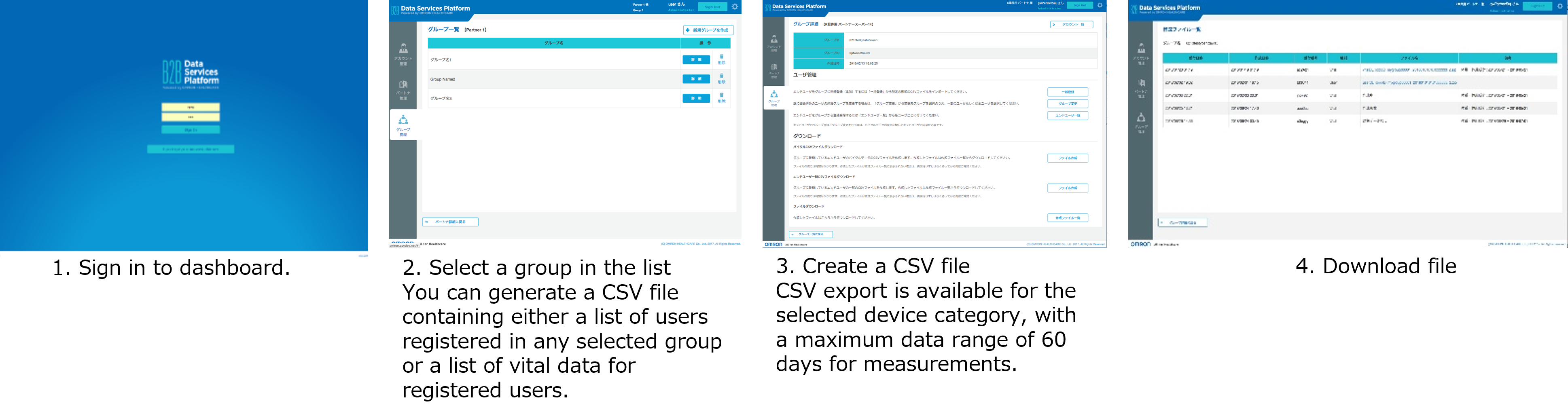
Manual CSV file download
Requirement and Limitation
Access Control
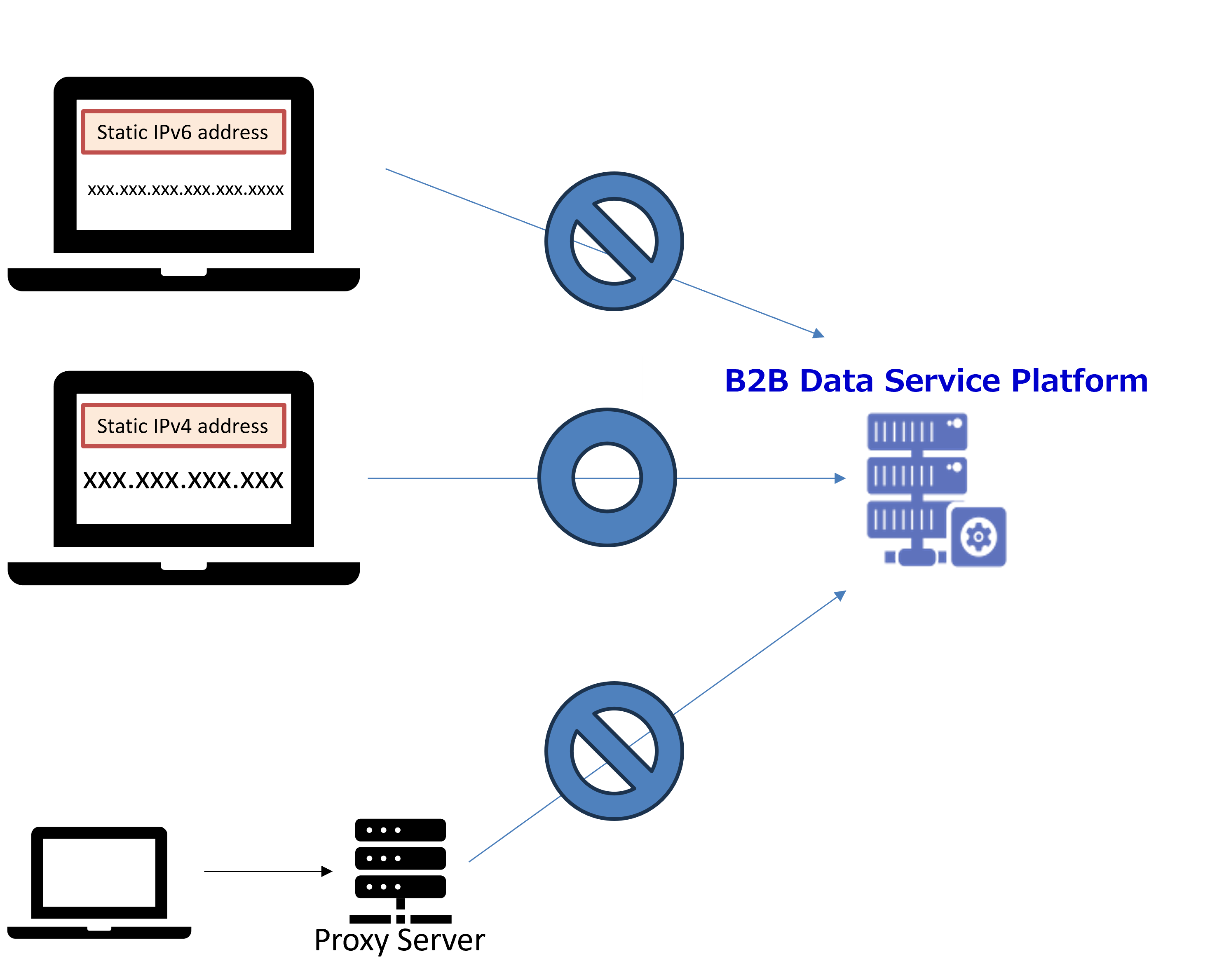
For security reasons, the DSP system restricts access to pre-registered IPv4 addresses only. Partners are requested to prepare global static IPv4 addresses to enable access.
Restrictions on Data Migration
The DSP provides a separate development environment in addition to the production environment.
Each environment is completely isolated, including its own database, to serve its specific purpose. So, please note that data migration between the development and production environments is not supported.
Schedule and Required Information
To set up your dedicated DSP environment, please provide the requested information below.
-
Environment type (Staging / Production)
-
Target Region 1
-
Language (JP / EN)
-
Timezone
-
Partner Name
-
Partner Admin account name
-
Partner Admin account ID 2
-
Partner Admin email address (, which is used for password reset) 3
-
Source global IP address (static) to access DSP
-
Data transfer method (API / SFTP/ Download CSV files on Admin Portal Site)
1:DSP servers are available in multiple countries, and we will select the appropriate one based on your target region.
2:Partner Admin account ID is used as authentication credentials.
3:From a security standpoint, it is preferable to use a personal email address.
Please note that each creation or modification of the environment typically requires up to 10 business days.
Geographic Availability
| Region | Country |
|---|---|
| Latin America | Argentina, Bolivia, Brazil, Chile, Colombia, Costa Rica, Dominican Republic, Ecuador, El Salvador, Guatemala, Honduras, Mexico, Nicaragua, Panama, Paraguay, Peru, Uruguay, Venezuela |
| East Asia | Hong-Kong, Japan, Korea, Macau, Mongolia, Taiwan |
| Southeast Asia | Cambodia, Indonesia, Laos, Malaysia, Myanmar, Philippines, Singapore, Thailand, Viet Nam |
| South Asia | Bangladesh, India, Sri Lanka |
| Oceania | Australia, New Zealand |
If you are considering using our cloud integration API in a country not listed in the released areas above, please feel free to contact us.
Contact US
For organizations interested in our B2B Data Service Platform, we welcome your inquiries. Please do not hesitate to contact us for additional information or to discuss your requirements.
Updated 8 months ago